Making single-board 29 × 29 bead patterns
Work within a 29 × 29 demonstration grid and compare three color limits before editing.
Let the board set the boundary
The bead studio uses one 29 × 29 demonstration grid. It fits the cropped picture within that board, preserves its physical proportions using the entered horizontal and vertical spacing, and centers the result. Empty space around the subject contains no beads.
Start with a bold silhouette. At 29 cells across, a small detail has very little room. Crop before generating and keep the recognizable outline inside the board. Multi-board patterns are not supported.
Compare colors on the same board
These three results use the same source and board with color limits of 4, 8 and 12. Compare the center detail as well as the actual color and bead counts.
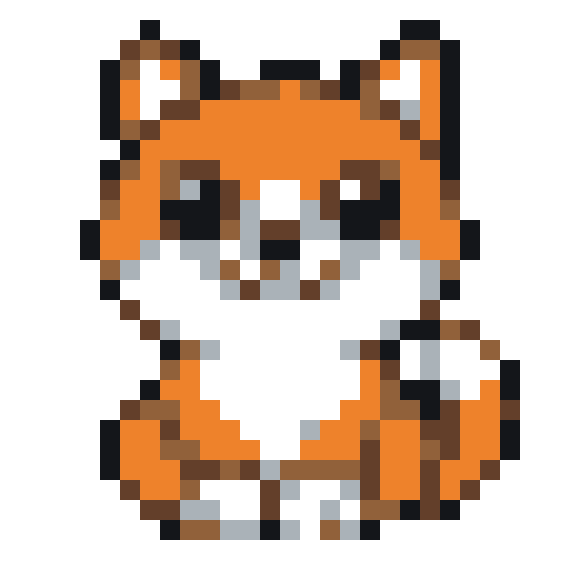
439 filled cells · 91 isolated cells · 153 cells in small regions
| Grid | Color limit | Actual colors | Filled cells | Isolated | Small-region cells |
|---|---|---|---|---|---|
| 29 × 29 | 4 | 4 | 439 | 55 | 85 |
| 29 × 29 | 8 | 6 | 439 | 91 | 153 |
| 29 × 29 | 12 | 9 | 439 | 133 | 191 |
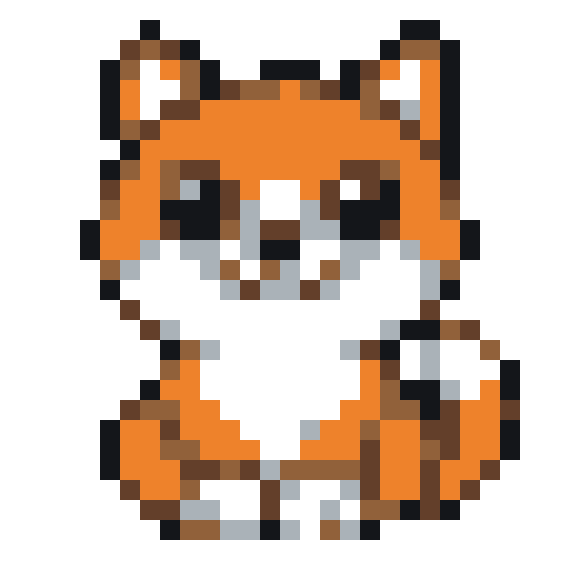
These are actual digital conversions using the same demonstration palette. A color limit is a maximum, not a promised number of colors. Different settings can produce identical results. Small-region cells belong to same-color groups of one or two cells connected horizontally or vertically. These counts describe the grid; they are not a difficulty score.
Try a small pattern, then prepare the print
Open a mushroom or cup from the practice shelf. Try color focus to inspect its outline, then use View pattern to locate a row and column without editing. If you change a material, inspect the full picture before exporting.
Choose a bead practiceMeasure your own board spacing and enter it before generating a template. The included 5 mm value is an unverified demonstration setting.
Try it in the bead studio